
SiteOwl Web App Update - June 9
New Favorite Fields
Favorites are key to building detailed, standardized designs quickly. We've enhanced them by adding support for two fields: Coverage Area and Instructions.
You can now define Coverage Angle and Coverage Direction directly within a Favorite. Coverage Range is not supported in this release.
As with all Favorite fields, these values will auto-populate on any device created from the Favorite—saving time and improving consistency. Both fields are also fully importable and exportable, enabling easier configuration management across Accounts.
Device Type Additions
When editing a Project or Live Site Plan, you'll find the following new Device Types are now available
System Type |
Devices Type |
| Video Surveillance |
|
Access Control |
|
| Infrastructure |
|
And remember that when editing a Plan, you can quickly find a Device or Task using the Devices/Task Search.
Consistent Filter Experience
Filters now update instantly whenever a device is modified. This enhancement ensures that your views remain accurate and up to date—devices that no longer meet your filter criteria will automatically be removed.
For example, if you're viewing only Non-Operational devices and update a device to Operational, it will immediately disappear from the filtered view.
DesignOwl Mobile App Update - Jan 13
Image Capture Improvements
Images are a crucial part of site walks, offering valuable insights into the location's current state and the work that needs to be completed. To accommodate different user needs, DesignOwl now offers two image-capturing options:
- Capture Button: Ideal for users focused on speed, this option allows quick image-taking without stopping to edit. Users can edit these images later by selecting them in any SiteOwl application.
- Capture and Edit Button: Designed for users requiring detailed documentation, this option enables image editing and annotation immediately after the image is taken.
Stability Improvements
This update also includes multiple important fixes, providing a better overall experience. As always, take advantage of all the latest features and enjoy the best possible experience by downloading the latest version to your device today.
Available on iPad
Download the latest version (3.2.6) here: Apple iOS App Store
Download the latest version (3.2.6) here: Apple iOS App Store
SiteOwl Web App Update - Jan 9
Improved Office-Field Communications
Seamless communication between office and field teams is central to SiteOwl’s mission. Our applications are designed to facilitate communication between your teams and provide them with the information they need. To improve this communication, Devices and Tasks now have two new fields, Instructions and Field Notes.
The Instructions field enables precise specification for technicians, while Field Notes, replacing the existing Installation Notes field, allows technicians to comprehensively document their work while in the field.
Additionally, we’ve expanded our default Flag email recipients to include Assigned To and Installed By users, ensuring they receive crucial updates to the Devices they’re working on.
Connecting Project Devices to Live Hubs
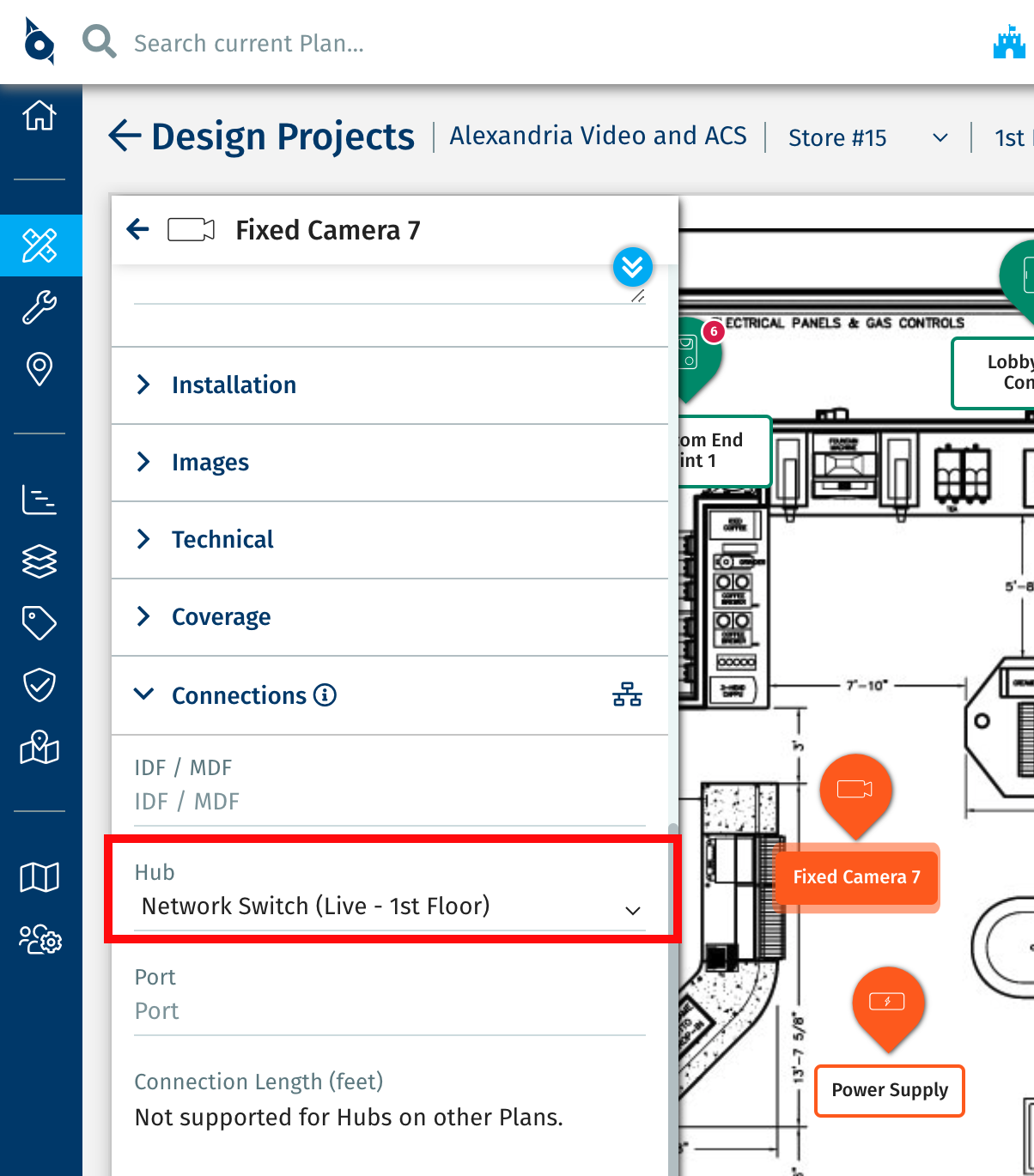
SiteOwl enables system lifecycle management by giving your teams full visibility into existing system infrastructure. Now, you can get even more detailed in your designs by connecting Project Devices to Live Hubs from previous Projects or Live Site imports. To use this feature, ensure Hubs are available in your Live Sites and open a Project using the same Plans as the Live Site. When assigning a Hub to your new Project Devices, all Live Hubs within the building will be available for selection.
Bulk Archive
Managing many Devices can be challenging, especially when multiple Devices need to be archived simultaneously. Users can now bulk archive and unarchive Devices using our export/import feature in the Device List views. Simply configure the Archived column and update its values during the standard import/export process.
SiteOwl Mobile App Upate - Jan 4
SiteOwl Mobile Service Tickets
SiteOwl Mobile is now the go-to solution for accessing Live Devices and managing Service Tickets in the field. Users can conveniently access Tickets via the Live Site List or directly through an associated Device. In both locations, key Ticket details are presented clearly for quick and easy reference.
When viewing a Ticket, users can easily update, comment on, and mark it as complete. Associated Devices are readily accessible through the Device List within the Ticket for quick reference.
To learn more about this feature, our 10 minute SiteOwl Mobile Live Sites: Tickets course.
The ServiceOwl application has been removed from the App Stores as part of this transition. Starting in February, existing ServiceOwl users will no longer be able to access or use previously downloaded versions of the app. Please ensure all ServiceOwl users have SiteOwl Mobile installed and are informed that they must fully transition to SiteOwl Mobile by late January.
Flag Resolution
SiteOwl Mobile streamlines communication between the field and the office, enabling efficient collaboration directly within the app. When viewing a Project Device or Task with a Flag, users can now resolve the Flag and add a Resolution Note detailing the action taken.
Comments
0 comments
Please sign in to leave a comment.