
SiteOwl Web App Update - Dec 3
Improved Navigation Between Plans and Device Lists
SiteOwl’s Plan and Device List views offer different methods of interacting with and editing Device data. Plans allow you to see Devices and their placements visually, while the Device List enables configurable bulk editing. Navigating between these two views is pivotal for fast and efficient work.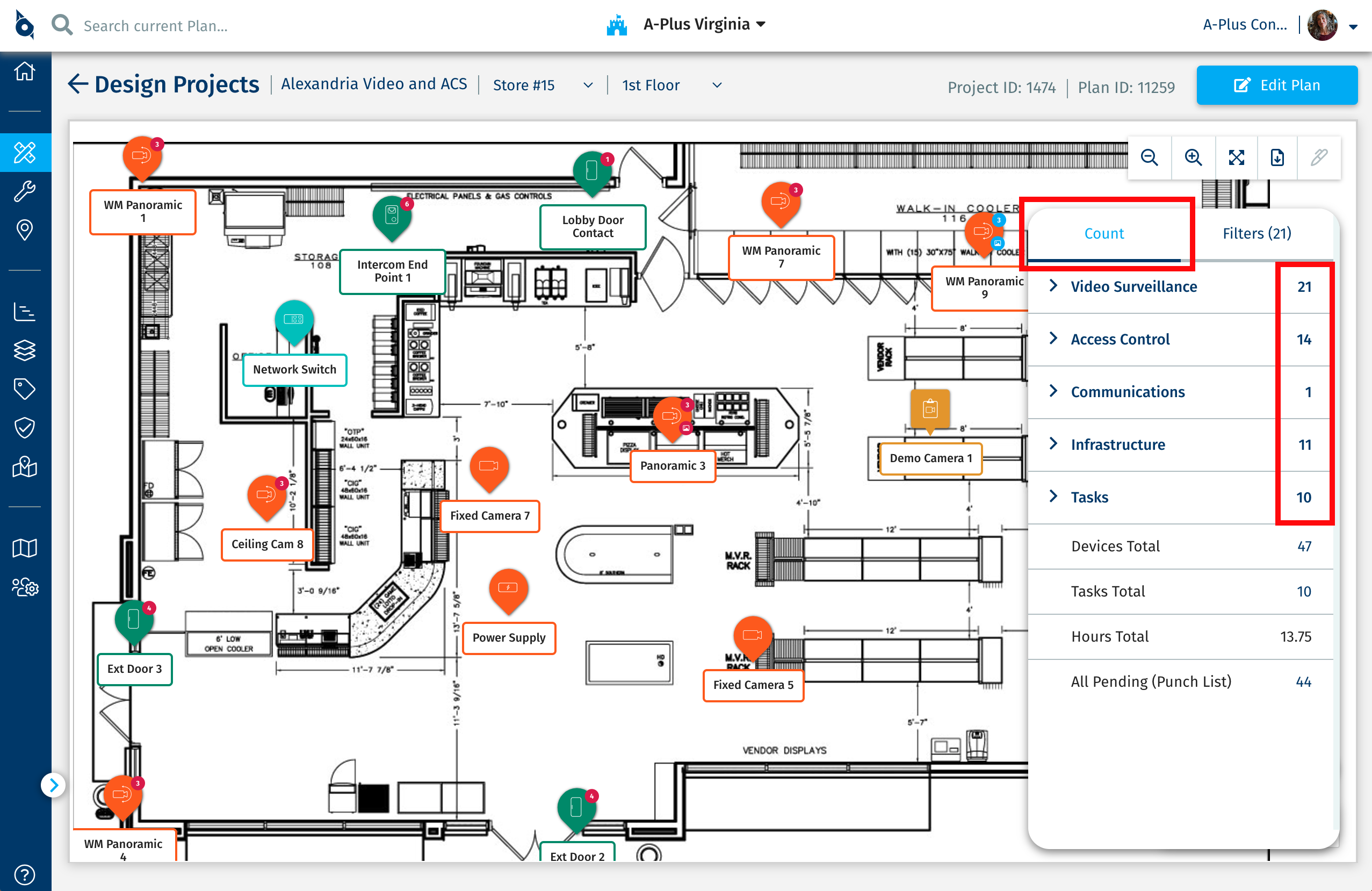
Currently, users can navigate quickly to the Device List from the Plan view using the clickable Device counts in the Plan Count Menu.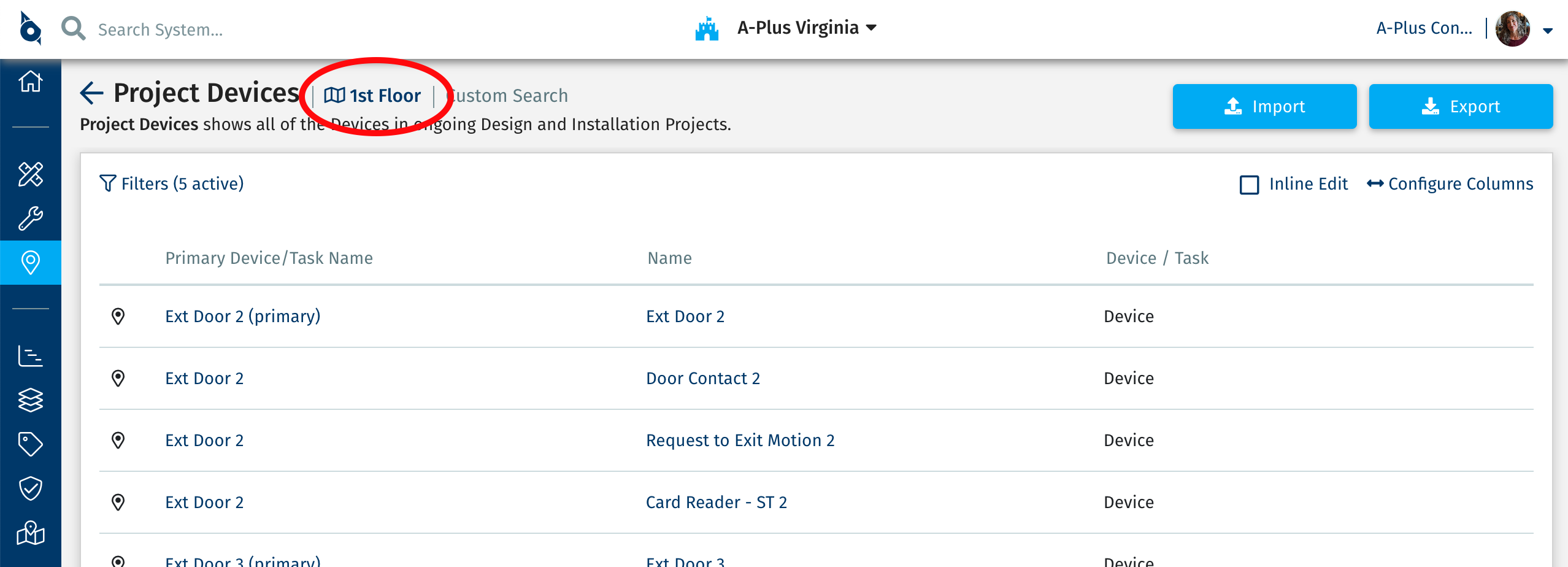
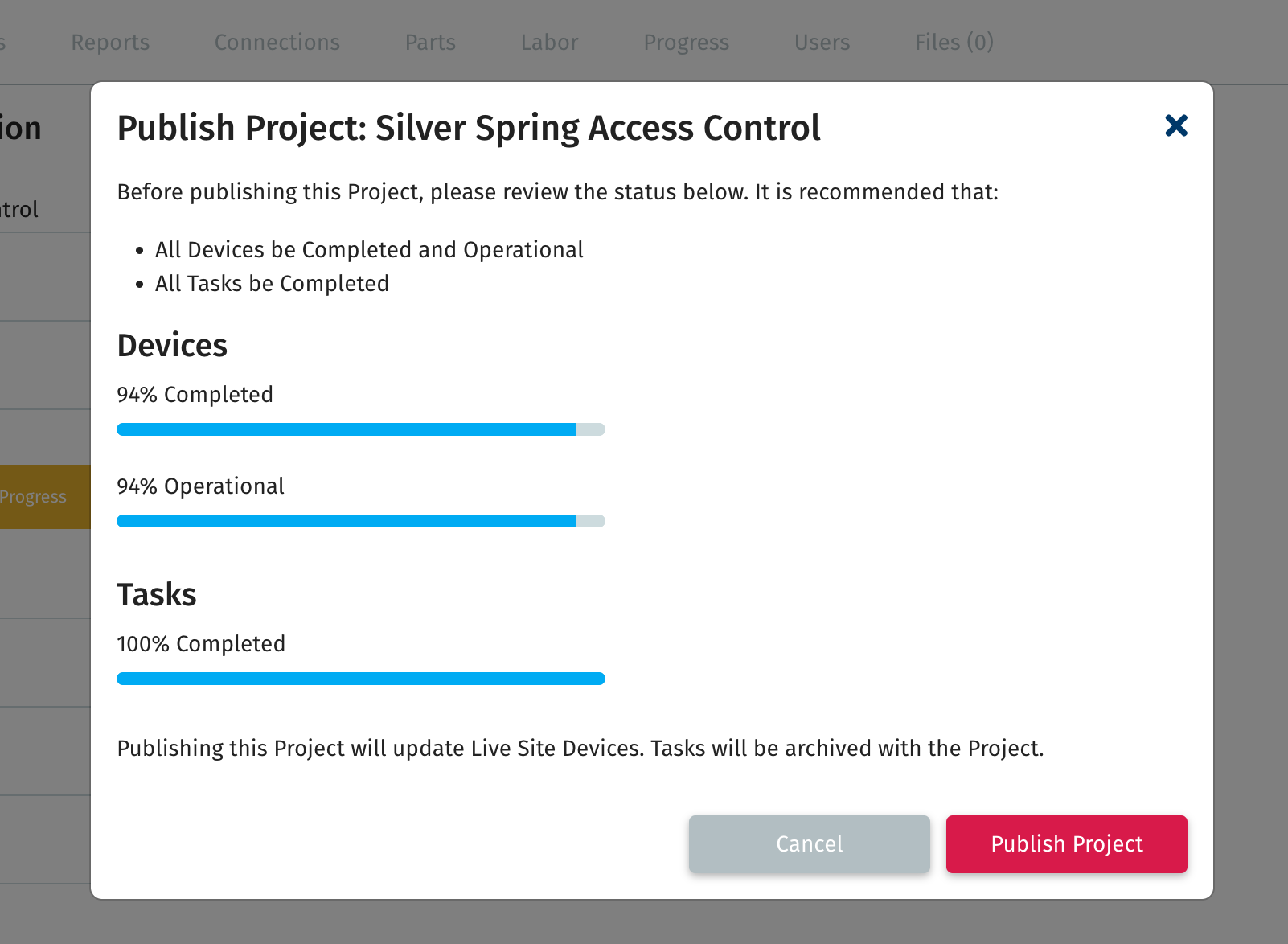
Improved Project Publish to Live SitesWhen publishing a Project to Live Sites, the confirmation for the Publish action now includes a clearer look at the Project's progress. There are now progress bars for Devices Completed, Devices Operational, and Tasks Completed. Together, these progress bars better indicate whether the Project is ready to be Published.
Faster Plan Filters
SiteOwl’s performance is a constant area of focus. In this release, the Filters available on the Plan view have been optimized for larger amounts of Devices. Enabling and disabling Filters on these plans is now notably faster.
Currently, users can navigate quickly to the Device List from the Plan view using the clickable Device counts in the Plan Count Menu.
Improved Project Publish to Live SitesWhen publishing a Project to Live Sites, the confirmation for the Publish action now includes a clearer look at the Project's progress. There are now progress bars for Devices Completed, Devices Operational, and Tasks Completed. Together, these progress bars better indicate whether the Project is ready to be Published.
Faster Plan Filters
SiteOwl’s performance is a constant area of focus. In this release, the Filters available on the Plan view have been optimized for larger amounts of Devices. Enabling and disabling Filters on these plans is now notably faster.
SiteOwl Web App Update - Nov 5
Improved Device Information
Earlier this year, we introduced our updated Device Information design that split Device data into clearly grouped categories. We received feedback that these categories make it faster to find specific information but can make initial data input more difficult due to the number of sections. To make accessing your Device information faster, we’ve added an option to expand and collapse all the categories.
We’ve also taken the generic Associated category and split its content into three specific categories:
- Connected Devices have been added to the Connections category.
- Service Tickets and Audits now have their own categories.
These changes will make locating and working with this data faster.
SiteOwl Web App Update - Oct 17
Visual Indicator When Switching Devices/Tasks
While working on a Plan, it can be difficult to tell when you’ve switched between Devices and Tasks. To help clearly indicate when you’ve successfully selected a new Device or Task, the name shown at the top of the Edit Panel now momentarily flashes.
Weekly Email Report Access
Account Administrators can now enable the Weekly Email Report for any user, regardless of their Account role. The report automatically filters to only include data the user can access. To enable this report for a user, navigate to the Account Settings menu, Users tab, then check the Email Report box.
Project ID Improvement
Previously difficult to locate, the Project ID is now conveniently displayed next to the Plan ID in the Plan view. This update ensures both IDs are easily accessible, simplifying the process of creating an import file.
SiteOwl Mobile App - Oct 12
For those who use SiteOwl Mobile, we wanted to let you know that we’ve released an update that includes some important fixes and performance improvements. This update addresses the issue affecting photos on older iOS and iPadOS versions that can result in black photo images.
To ensure that you can take advantage of all the latest features and enjoy the best possible experience with the app, we recommend that you download the latest version to your mobile phone as soon as possible.
 SiteOwl Mobile Version 3.2.5 is available in the Apple iOS App Store or Google Play
SiteOwl Web App Update - Oct 7
Improved Installation Project Card
The Project List view provides important high-level information about the progress of your Projects. To help with the difficult task of managing Installation Projects, additional information has been added to the Installation Projects list.
The work on a Device isn’t truly completed until it's Operational through Test and Commission. To support tracking this crucial step, Operational Status information has been added in multiple places. Installation Project Cards now display progress bars for Device/Tasks Completed, Devices Operational, and Budgeted Hours Completed, giving you this information at a glance. This enables you to quickly scan all of your Projects, providing a more complete picture of progress.
When the Project Card is expanded, Devices/Tasks Completed and Devices Operational progress bars are now shown, giving you the status of each Building and Plan at a glance.
Lastly, Installation Projects with a Status of Done are no longer included in Dashboard counts or weekly email reports. Completed Projects serve as a digital record of the Project, but shouldn’t impact your day-to-day reporting. To change the Status of a Project, navigate to Project information and update the Installation Status field.
New Configurable Column: Date Flagged
SiteOwl Flags are a core method of communication between the office and the field. Reviewing Flags is key to understanding the ongoing blockers and problems in your Projects. We’ve added the ability to configure Date Flagged as a column on the Project Devices screen so that you can easily see when a Flag was added to a Device or Task. This column is also selected by default when using the Flag Review preset column configuration. Sorting by this column gives you a clearer picture of which issues are most recent and which have been outstanding the longest, for more precise project management.
Ticket Assignee Email Notifications
The SiteOwl platform sends email notifications for important Ticket actions, including the creation of new Tickets or new comments on existing Tickets. Now, to help all parties track the status of a Ticket, an email will be sent to the Ticket Requester, new Assignee, and all Ticket Watchers when the Assignee of the Ticket changes.
Highlighting Text Fix
There have been reports of a bug causing a Device to be deselected on the Plan view if you highlight a Device field from right to left, making data updates inefficient as the Device must be reselected. This bug has been fixed allowing you to highlight Device fields without issue.
SiteOwl Mobile Update - Sept 30
This update includes some important fixes and performance improvements as well as support for the new Budgeted Cost and Budgeted Hours fields in the application.
 SiteOwl Mobile Version 3.2.4 is available in the Apple iOS App Store and Google Play
SiteOwl Web App Update - Sept 12
Recent Activity Report/Email
The Daily Installation Report/Email has been improved and now includes more data and high-level metrics to keep you up-to-date through every step of an Installation Project. Now called Recent Activity, the report still includes changes in Completion Status and Notes, but now includes Devices and Tasks that have changed Operational Status or have had a Flag added to them.
Additionally, we’ve added a summary section to each Project that highlights recent changes and the current status of the Project. The Recent Activity section provides summary information about activity during the time range of the report/email, including the number of Devices that have been Completed, moved to Operational, and had Flags added to them. The Project Status section provides information on the current state of the Project and includes the number of Devices in each Status category for the Project alongside the total number of unresolved Flags in the Project.
Flags and regressions in Status (ie. a Device that regressed from Completed to In-Progress) are highlighted in red.
Together, these changes improve your ability to assess project progress and issues. The Recent Activity Report can be accessed through the Reports tab on any Installation Project or can be automatically emailed.
DesignOwl Mobile App Update - Sept 12
Stability Improvements
For those who use SiteOwl's DesignOwl, we wanted to let you know that we’ve released an update that includes some important fixes and performance improvements. To ensure that you can take advantage of all the latest features and enjoy the best possible experience with the app, we recommend that you download the latest version to your iPad as soon as possible.
DesignOwl Version 3.2.0 is available in the Apple iOS App StoreSiteOwl Web App Update - Aug 8
Improved Device Editing Interface
We’re excited to reveal an updated Edit Panel interface to help you quickly find and update Device details. Information is now broken into sections of related fields. For example, the Identification section contains fields such as Device Name, Abbreviated Name, and Part Number. The sections stay open and maintain scroll position while switching from Device to Device, making it easy to focus on specific fields across Devices.
Since this functionality is crucial to the application, your input is greatly appreciated. Please contact your Customer Success Manager or email support@siteowl.com with feedback or questions.
Improved Project Progress Report
The Project Progress report provides an in-depth look into the status of your Project. Previously, this report was focused on completion percentage, with each bar in the chart the same length regardless of the number of Devices. This made it easy to see the percentage of Devices and Tasks in each stage of completion but didn’t provide an understanding of the counts. The new default Count view makes it easy to understand the composition of your Project while also displaying completion progress for each Device and Task type.
The Percentage view can still be accessed by selecting the Percentage option at the top right of the report.
DesignOwl and SiteOwl Mobile Update - Aug 8
Stability Improvements
We have continued to release updates to both SiteOwl Mobile and DesignOwl. These updates include multiple important fixes, providing a better overall experience. Take advantage of all the latest features and enjoy the best possible experience by downloading the latest version to your device today.
DesignOwl Version 3.1.2 is available in the Apple iOS App StoreSiteOwl Mobile Version 3.2.2 is available in the Apple iOS App Store or Google PlaySiteOwl Web App Update - July 24
New Budgeted Hours and Cost Fields
With SiteOwl, users are able to quickly get a sense of the parts and labor needed for a Project. Since meaningful quotes rely on accurate and detailed Device information, we’ve added two new fields: Budgeted Cost and Budgeted Hours. These fields are also accessible in Favorites and are exportable. Users can still access the Replacement Cost field in Projects and Live Sites for longer term planning and budgeting.
New Project Labor Tab
One of the SiteOwl reports utilizing the new Budgeted Cost and Budgeted Hours fields is found on the new Project Labor tab. This report combines Device and Task data together, allowing you to see the Total Budgeted Cost and Total Budgeted Hours across every Device and Task in a Project.
DesignOwl Mobile App Update - July 24
Stability Improvements
This update to DesignOwl includes multiple important fixes, providing a better overall experience. Take advantage of all the latest features and enjoy the best possible experience by downloading the latest version to your iPad today.
DesignOwl Version 3.1.1 is available in the Apple iOS App StoreSiteOwl Web App Update - May 16
New Live Site Role: Ticket Submitter
SiteOwl Service Tickets are a great tool for aligning Security Teams and Integrators on existing device issues. While it’s important for personnel to be able to view problematic devices and raise Service Tickets, these users don’t always need to be able to edit the devices themselves. To support these types of users in SiteOwl, we’ve added the Ticket Submitter option to the Live Site Roles. Users with the Ticket Submitter role can be given granular access to specific Live Sites and raise Service Tickets for Devices on those sites. This role is currently available in the Web Application and will be coming to our Mobile Applications in the coming months.
Plan Scale Improvements
Scaling a Plan in SiteOwl unlocks useful features like realtime Connection and Cable Pathway lengths. To help ensure precise measurements, we’ve added the ability to zoom while setting the Plan Scale in the Plan Library. Zoom controls can be found at the top right of the screen when initially scaling or re-scaling a Plan.
Exportable Device Links
Shareable Links allow quick and easy access to many important items in SiteOwl, including Projects and Devices. Now, on the Project and Live Site Devices Lists, Shareable Links have been added as a configurable column. Once configured, the links can be generated directly from the list view or exported in CSV format, making them even easier to use and share. Learn more about Shareable Links here.
SiteOwl Web App Update - April 22
Headquarters and Accounts
Beginning today, Integrator users will notice two changes to the following menu options in the Web App:
Integrator Dashboard is now named Headquarters.
Customers is now named AccountsThe functionality of these options has not changed, only the names have changed. Integrators will continue to manage users and customers in the same way. Clicking the Headquarters drop-down allows you to switch between your Accounts.
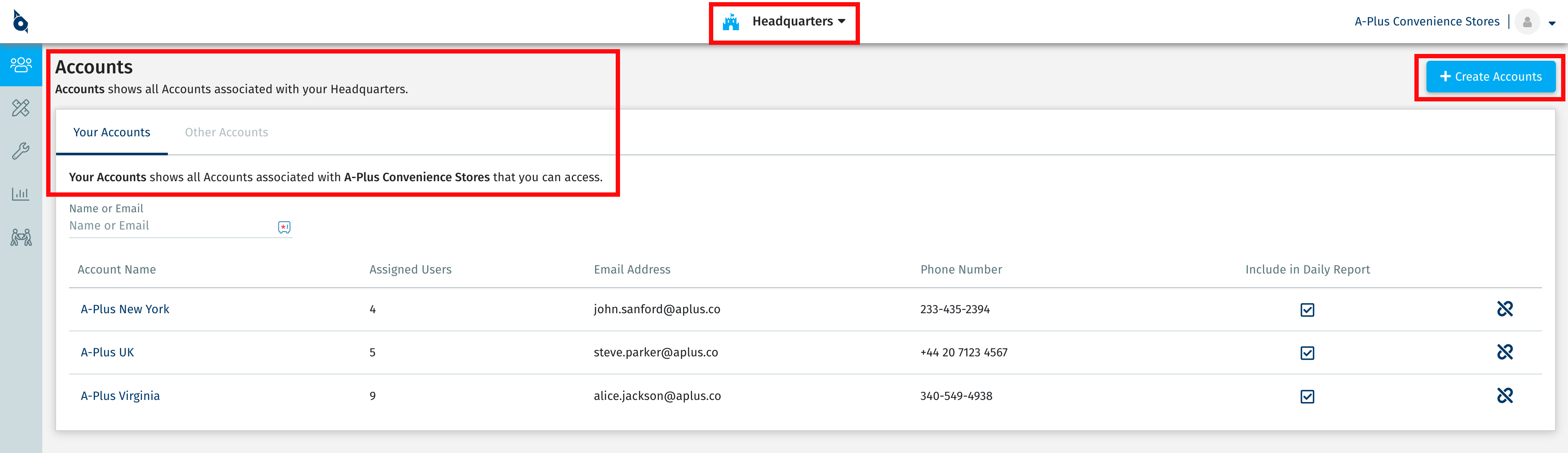
For Security Team users, your Customer Success Manager will contact you soon to provide access to your own Headquarters.
SiteOwl Web App Update - April 22
Search Improvements
SiteOwl’s Search tools provide a powerful way to contextually find specific Devices, Tasks, or Service Tickets. We’ve improved Plan Search and System Search to display more informative data in the results.
Check out our Knowledge Base Article on Using the Search Bar to learn more.
Integrator Dashboard is now named Headquarters.
Customers is now named AccountsThe functionality of these options has not changed, only the names have changed. Integrators will continue to manage users and customers in the same way. Clicking the Headquarters drop-down allows you to switch between your Accounts.
For Security Team users, your Customer Success Manager will contact you soon to provide access to your own Headquarters.
SiteOwl Web App Update - April 22
Search Improvements
SiteOwl’s Search tools provide a powerful way to contextually find specific Devices, Tasks, or Service Tickets. We’ve improved Plan Search and System Search to display more informative data in the results.
Check out our Knowledge Base Article on Using the Search Bar to learn more.
New Device Types
When editing a Project or Live Site Plan, you'll find the following new Device Types are now available:
And remember that when editing a Plan, you can quickly find a Device or Task using the Devices/Task Search.
System Types with matching results will immediately filter as you type.
Integrator Dashboard Change
Starting on April 18th, Integrator Users will see an option for Headquarters instead of Integrator Dashboard. Selecting Headquarters will still allow you to manage your Users and Customers. In addition, Customers will change to Accounts. These changes are only textual in nature and do not alter any of the existing functionality in this view.
SiteOwl Web App Update - Feb 26
Flag Enhancements
SiteOwl Flags are a fast and efficient method of communication between the office and the field. We’re excited to introduce multiple enhancements to Flags that will greatly improve your team’s Project productivity.
Currently, when a user adds a Flag to a Device or Task, an email is sent to the Project Manager. However, Projects often have multiple stakeholders who need to understand the blockages and problems impeding progress in the field. To support greater visibility into these issues, we’ve added the ability to notify multiple users when a Flag is added to a Device or Task. Multiple users can be configured to receive Flag emails by checking the Flag Notifications checkbox on the Project Users tab.
Currently, when a user adds a Flag to a Device or Task, an email is sent to the Project Manager. However, Projects often have multiple stakeholders who need to understand the blockages and problems impeding progress in the field. To support greater visibility into these issues, we’ve added the ability to notify multiple users when a Flag is added to a Device or Task. Multiple users can be configured to receive Flag emails by checking the Flag Notifications checkbox on the Project Users tab.
To identify and review the open Flags in Projects, we’ve added the Flag Count to Project Cards. When clicked, a pre-filtered list of the Project’s Flagged Devices/Tasks is displayed.
Improved Device Labels
When viewing a Project or Live Site Plan, the Device labels (Device Name, Abbreviated Name, and Part Number) can contain a lot of important identifying information. We've improved these labels so that the entire text is visible and added separation between each label type.
Uncreased File Size Limit
SiteOwl serves as the hub for all of your physical security related data. In an effort to better support the association of external documents with SiteOwl Projects and Live Sites, we’ve substantially increased the file size limit. Files up to 200 megabytes can now be uploaded to Projects and Live Sites on the Files tab.
SiteOwl Web App Update - Jan 11
Connection Length: Now Exportable
Connection Length elevates your project planning and execution by providing detailed insights into the length of basic Connections and Cable Pathways. The Connection Length field is now a configurable and exportable column on the Device List screens. Once exported, Excel functions can be used to analyze and sum the lengths.
To take advantage of this feature, your Plans must have a scale value entered in the Plan Library. Learn more about scaling Plans here. Once the Plan scale is set, Connection Length is automatically calculated.
Flag Improvements
SiteOwl Flags are a core method of communication between the office and the field. Currently, users can add a Flag to a Device or Task and include a note describing the issue. Now, users also have the ability to Resolve the Flag and enter a corresponding Flag Resolution note. Additionally, the user who originally flagged the item will receive an email notifying them of the resolution.
For example, if a Technician were to Flag a Device while in the field, the assigned Project Manager will be notified. Once the Flag is Resolved by the Project Manager, the Technician will receive an email notification that includes the resolution notes.
The option to add a Flag Resolution is coming to InstallOwl later this year.
Comments
0 comments
Please sign in to leave a comment.